
Jugo includes presenter tools that help you look clear, well-framed, and easy to focus on, without turning your setup into a full production studio. These tools work alongside Zoom and Teams to make small adjustments that add up to a more polished on-camera presence.
This article explains what each tool does and when to use it.
Framing and what it does
Framing helps position you correctly in the shot so you don’t look too low, too high, or awkwardly off-centre.
-
Keeps your face and shoulders positioned naturally in the frame
-
Helps avoid 'too much headroom' or being cropped too tightly
-
Makes your on-screen position feel consistent across sessions
When to use Framing
-
Your camera is slightly below or above eye level
-
You tend to move around while speaking
-
You want a more balanced, professional-looking shot without adjusting your physical camera
Tips for best results
-
Try to keep your camera roughly at eye level
-
Sit at a comfortable distance so your head and shoulders are visible
-
Framing works best when your camera angle is already close to correct
Lighting and what it does
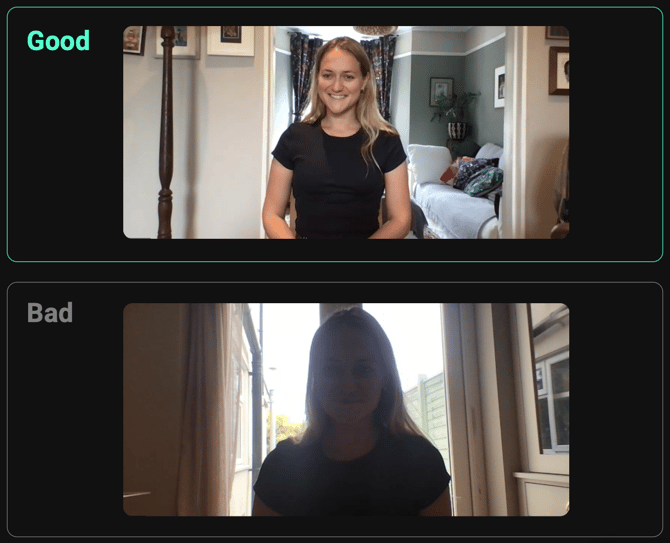
Lighting helps even out brightness so your face is visible and not lost in shadow.
-
Brightens dark areas of your face
-
Reduces harsh shadows caused by overhead or side lighting
-
Helps your camera adapt to uneven room lighting
When to use Lighting
-
You’re in a dim room or backlit by a window
-
Your face looks shadowed or uneven on camera
-
You don’t have a dedicated light setup
Tips for best results
-
Face a light source where possible (window or lamp)
-
Avoid strong light directly behind you
-
Small lighting adjustments usually look more natural than maxing it out
Focus
Focus helps keep you visually clear and distinct from the background.
What focus does
-
Keeps attention on you as the presenter
-
Reduces distractions from busy or cluttered backgrounds
-
Helps your camera stay locked on you rather than hunting for focus
When to use Focus
-
Your background is visually busy
-
Your camera struggles to stay focused
-
You want to clearly separate yourself from the environment
Tips for best results
-
Make sure your face is well lit
-
Sit at a consistent distance from the camera
-
Avoid sudden, large movements that can confuse autofocus
Using presenter tools together
Framing, lighting, and focus are designed to work best as a set:
-
Framing handles where you are in the shot
-
Lighting handles how clearly you’re seen
-
Focus handles what viewers pay attention to
You don’t need all three on at once, small adjustments usually go a long way.
Troubleshooting
I look washed out or unnatural
-
Reduce lighting strength
-
Check for strong lights or windows behind you
My face keeps going out of focus
-
Improve lighting on your face
-
Reduce background movement
-
Sit slightly further from the camera
Framing feels “off”
-
Reposition your camera physically
-
Check your seating height and distance
-
Use framing to fine-tune, not completely correct, the shot
Good to know
-
Presenter tools enhance your video feed, but don’t replace good camera placement
-
Results can vary depending on your camera, lighting, and device performance
-
These tools work best when your basic setup is already reasonable
For any issues beyond the contents of this article, please get in touch with our team and they'll do their best to help you further