
We offer flexible pricing plans designed to support individuals, teams, and large enterprises, whether you’re hosting occasional experiences or running high-volume immersive events at scale.
Our plans fall into two main categories:
-
Platform subscriptions (for using Jugo software)
-
Studio & experience packages (for companies running live experiences (all hands meetings, presentations, fan engagement etc)
Below is a full breakdown of each option.
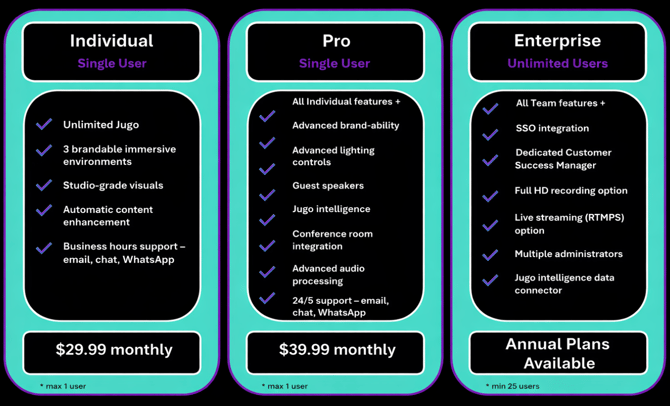
Jugo SaaS - Monthly Subscription (Individual, Pro and Enterprise)
Monthly subscriptions for solo creators, presenters and salespeople:
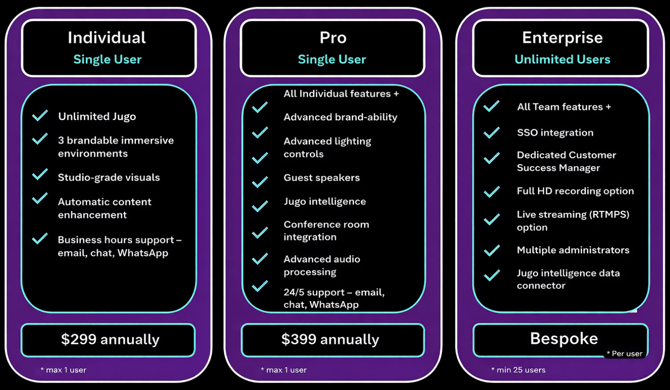
Jugo SaaS - Yearly Subscription (Individual, Pro and Enterprise)
Yearly subscriptions for solo creators, presenters and salespeople will be discounted 20% from the monthly plans:
Jugo SaaS - Enterprise pricing
Every business is different, and we treat it that way. Instead of squeezing everyone into the same plan, we create bespoke packages for organisations looking to roll out our SaaS at scale, tailored to your goals, team size, and setup.
Need help choosing a plan?
If you’re unsure which plan is right for you, our team is happy to help assess your needs and recommend the best option.
Contact our sales or customer success/ support team to discuss your use case or request bespoke pricing.
Does my account renew automatically?
Yep, unless you tell us otherwise. We’ll send you a reminder as you’re nearing the end of your plan, so renewal doesn’t sneak up on you. If you don’t want to continue, you can cancel anytime. If you do nothing, your plan will renew automatically, and you’ll be billed the same way (monthly or yearly) on the same date as before.
What happens if I can’t pay (or there’s not enough money in my account)?
We’ll try to take payment on your usual billing date (monthly or yearly). If it doesn’t go through, we’ll give you 24 hours to retry. If it’s still unpaid after that, we’ll pause/suspend your account.
Don’t worry - you can still log in and access your account, but the features will be switched off until payment is made. To get everything back up and running, just head to the billing page and make a payment.